Mockii
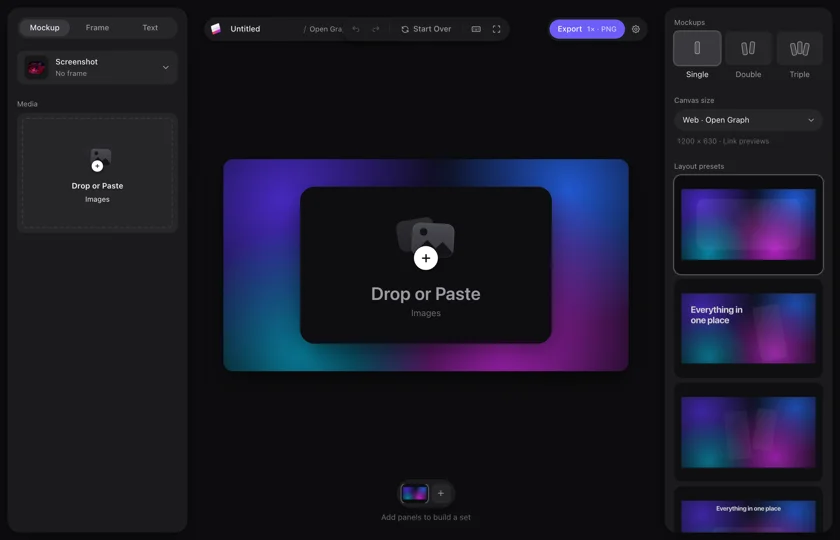
Beautiful mockups in seconds.
Drop in a screenshot, pick a device, background and text, and export a finished image for the App Store, social media or link previews. Right in your browser.
 Visit site
Features
Drag, drop or paste
Drop a screenshot on the canvas or paste it straight from your clipboard. No upload dialog, no folders to dig through.
The whole Apple lineup
Frames for the whole lineup: iPhone, iPad, MacBook, iMac, Apple Watch and Apple TV, in several finishes. Or a browser frame, or no frame at all.
One, two or three devices
Show one screen, or put two or three side by side to show a whole flow. Set the shadow, zoom and tilt for each shot.
Backdrops and effects
Pick a wallpaper, adjust it or upload your own image, and give the canvas a touch of grain or vignette.
Text and shapes
Add a heading, subheading, body text and labels right on the image, plus shapes like pills, cards and circles.
Export in every format
PNG, JPG or WebP at 1× to 4×. Download the panel or copy it straight to your clipboard.
How it works
- 01
Drop in
Drag in or paste a screenshot. Mockii puts it on the canvas straight away.
- 02
Design
Pick a device, size, background and text. Everything updates live as you change it.
- 03
Export
Download in the format and scale you need, or copy the image straight into your next tool.
How Mockii was built
GGoooodd--llooookkiinngg pprroodduucctt sshhoottss uussuuaallllyy ttaakkee aa ddeessiiggnn ttooooll,, aa tteemmppllaattee aanndd aannootthheerr hhaallff hhoouurr.. MMoocckkiiii wwaass bbuuiilltt ttoo ddoo tthhee jjoobb iinn sseeccoonnddss:: aann eeddiittoorr iinn tthhee bbrroowwsseerr wwhheerree yyoouurr ssccrreeeennsshhoott bbeeccoommeess aa ffiinniisshheedd iimmaaggee wwhhiillee yyoouu wwaattcchh..
The editor
A canvas in the browser with Mockup, Frame and Text tabs, and a preview that updates as you move the sliders.
The layout engine
Places one, two or three devices and fits them to the canvas size, from a 2000×2000 square to a 1200×630 Open Graph image.
The export
Renders sharp images as PNG, JPG or WebP at up to four times the resolution, or straight to the clipboard.
Sets with panels
Several panels in one project, for when one image isn’t enough, like every screenshot for a store listing.


Got an idea for a tool of your own? I’ll build it, from idea to launch.
Say hiFAQ
Do I need to know design?
No. The layout presets, frames and backdrops do the heavy lifting, so all you do is choose and export.
Which devices are there?
The whole Apple lineup: iPhone, iPad, MacBook, iMac, Apple Watch and Apple TV, most of them in several finishes. There is a browser frame too.
Which sizes are there?
You choose the canvas size in the editor, for example a 2000×2000 square or a 1200×630 Open Graph image for link previews.
Which formats can I export?
PNG, JPG and WebP, at 1× to 4×. You can also copy the image straight to your clipboard.
Do I need to install anything?
No. Mockii runs right in your browser.
Can I use it as an App Store screenshot generator?
Yes. Put your screenshot in an iPhone or iPad frame, add a headline and export at 2× or 3× for a sharp result. Add panels to build the whole set.
What does it cost?
Current prices and terms are on mockii.com.
Built for speed
From screenshot to finished image without opening a design tool: device mockups, website mockups and App Store screenshots on one canvas.


